
TL;DR
Background removal is best when the original photo already has good lighting, sharp edges, and a usable pose. Generated backgrounds are better when the image needs a studio look, brand consistency, or a setting that never existed in the original photo.
A clean headshot background can make a profile feel polished, but the wrong edit can make a real person look pasted onto a wall. The core choice in AI headshot background removal vs generated background is simple: keep the original subject and remove distractions, or rebuild the scene around the face. [AI headshot background removal]: an editing process that separates a person from an existing photo background. [Generated background]: an AI-created setting, such as a studio wall, office, outdoor blur, or branded scene, placed behind the subject. For people who need professional images fast, Looktara focuses on profile-ready headshots where the background supports the face instead of competing with it.
Table of Contents
What is the difference between background removal and a generated background?
Background removal deletes or masks the original setting behind a headshot, while a generated background creates a new setting that may include lighting, depth, texture, and style cues. A headshot, by definition, is a portrait focused on the subject's face, so the best background is the one that makes facial expression, trust, and identity easier to read.
Background removal is usually a corrective edit. It works well when a photo has a strong subject but a messy room, crowded street, office clutter, or harsh color behind the person.
A generated background is a creative reconstruction. It can turn a casual phone photo into a studio-style portrait with a neutral gray backdrop, soft office blur, warm interior, or platform-specific look.
Key insight: background removal fixes what is behind the person; background generation designs what the image should communicate.
Core terms for quick comparison
| Term | What it changes | Best result |
|---|---|---|
| Background removal | Removes the existing scene | Clean cutout or transparent background |
| Background replacement | Adds a selected color, image, or template | Simple professional update |
| Generated background | Creates a new AI-designed setting | Studio-style or brand-matched image |
| Full AI headshot generation | Rebuilds more of the portrait style | Consistent set of profile photos |
Public tools such as Adobe Express, Picsart, Remove.bg, Photoroom, and Fotor show how common background removal has become. Fotor, launched in 2012 by Chengdu Everimaging Science and Technology Co., Ltd., is one example of online photo editing software that expanded from general editing into AI-assisted image workflows.
Research on face synthesis also explains why this distinction matters. A 2024 IEEE survey on StyleGAN-based face generation and editing examined methods for generating and editing human faces, a related but broader field than simple background removal.
How does each option affect professional headshot quality?
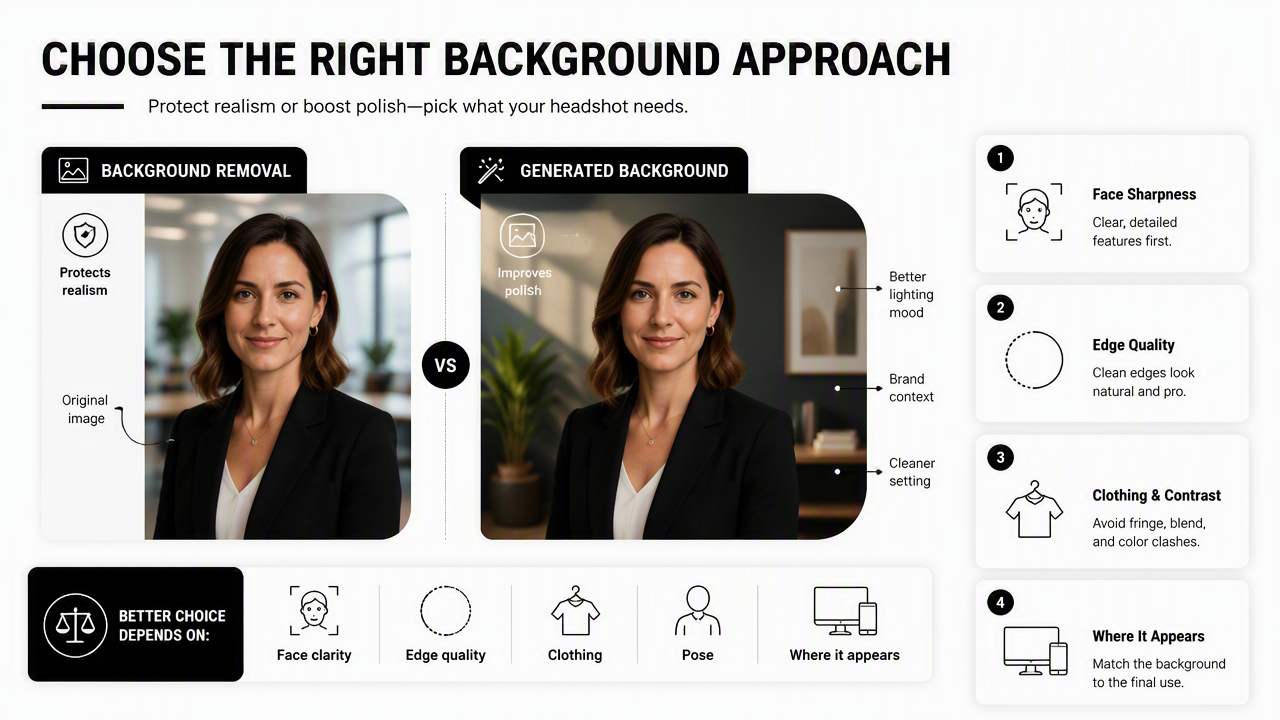
Background removal protects realism when the original image is already strong; generated backgrounds improve polish when the source image needs a better setting, lighting mood, or brand context. The better choice depends on edge quality, face clarity, clothing, pose, and where the headshot will appear.
Quality factors that decide the edit
- Face sharpness: blurry eyes or skin texture cannot be fixed by a better wall.
- Hair edges: curls, flyaways, veils, and loose strands reveal weak cutouts quickly.
- Lighting direction: a bright studio background behind a dim subject looks fake.
- Shoulder shape: cropped arms or uneven collars can make a new setting feel unnatural.
- Platform norms: LinkedIn, resumes, and company pages reward clarity more than artistic flair.
Background removal often wins for conservative professional uses because it changes less. A recruiter or hiring manager usually needs a clear face, direct expression, and low visual noise, not a dramatic environment.
Generated backgrounds win when consistency matters across multiple images. A founder page, speaker kit, creator media kit, or remote team directory can look more organized when portraits share similar tones and backdrop styles.
Common artifacts to check before publishing
- Uneven halos around hair, ears, glasses, or shoulders
- Mismatched shadows under the chin or along the neck
- Background blur that conflicts with a sharply lit subject
- Over-smooth skin that makes the portrait look synthetic
- Unrealistic office, studio, or outdoor depth behind the head
Human viewers are not perfect at detecting synthetic face imagery. A 2023 Journal of Cybersecurity study tested human ability to detect deepfake images of human faces, which makes authenticity checks especially relevant for professional portraits.
A practical rule works well: if the original person already looks credible, remove distractions. If the original setting weakens the message, generate a background that fits the purpose.
Which background choice fits LinkedIn, resumes, dating apps, and creator profiles?
The right background choice depends on the platform's trust signals: LinkedIn and resumes need clean professionalism, company websites need consistency, dating apps need warmth, and creator profiles need personality without visual clutter. One edit should not be used everywhere.
Decision table by profile use case
| Use case | Better choice | Why it works | Example background |
|---|---|---|---|
| LinkedIn profile | Generated background or clean removal | Signals polish without distraction | Soft gray, office blur, muted studio |
| Resume headshot | Background removal | Keeps the image simple and document-friendly | White, off-white, light gray |
| Company website | Generated background | Creates consistent team imagery | Branded neutral, matching studio tone |
| Dating app | Light generated background | Adds warmth while keeping authenticity | Natural outdoor blur, cafe tone |
| Creator profile | Generated background | Supports niche, style, or personal brand | Fitness studio, workspace, color wash |
| Speaker bio | Generated background | Looks media-ready across event pages | Dark studio, editorial neutral |
| Marketplace or Shopify profile | Background removal | Keeps focus on seller or product trust | White or brand-neutral backdrop |
LinkedIn and resume images are closest to classic headshots. A neutral generated setting can look excellent, but it should not announce itself as AI-created. For fitness and career profiles, a purpose-built LinkedIn and resume headshot generator can help create a cleaner professional frame without adding busy details.
Company websites benefit from generated backgrounds because brand consistency matters more than preserving the original room. When ten team members submit photos taken in different apartments, cars, gyms, or events, a shared visual style can make the whole page feel planned.
Dating app photos follow a different rule. Overly corporate backgrounds can feel stiff. A warm generated setting works best when it still looks like a real moment, with natural light, believable depth, and relaxed styling.
Creators and entrepreneurs can use more personality. A fitness coach, Shopify seller, consultant, or Pinterest creator may need images that connect identity with a niche. For commerce-focused profile imagery, a Shopify resume headshot AI generator is most useful when the photo needs to feel clean, credible, and brand-aware.
How should AI headshot background removal vs generated background be chosen?
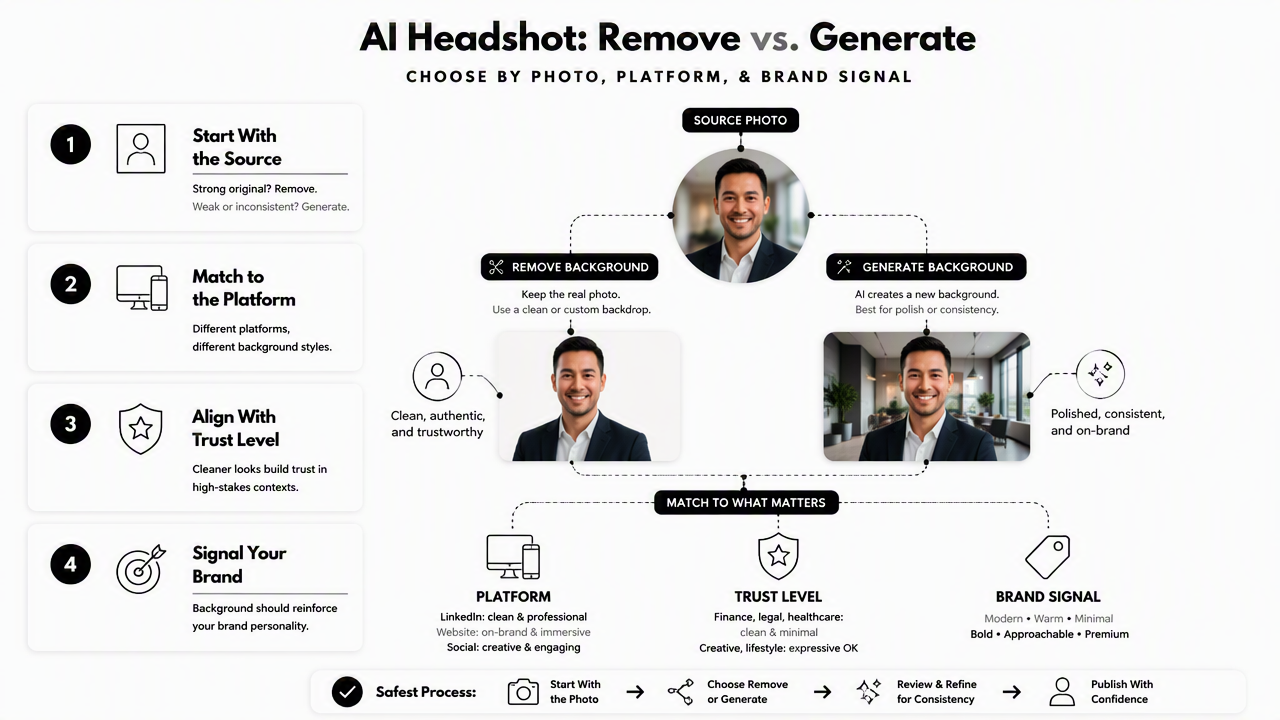
AI headshot background removal vs generated background should be chosen by starting with the source photo, then matching the background style to the platform, trust level, and desired brand signal. The safest process uses background removal for strong originals and generated backgrounds for consistency, polish, or platform-specific storytelling.
A simple 5-step decision workflow
- Check the original photo quality: keep only images with sharp eyes, natural expression, and clean facial detail.
- Define the profile context: separate job search, dating, creator, founder, and company-directory needs.
- Choose the smallest edit that solves the problem: remove clutter if the setting is the only issue.
- Generate a new setting when consistency matters: match color, depth, and lighting across multiple headshots.
- Review for realism at small sizes: most profile photos appear as thumbnails before full-size viewing.
Generated backgrounds should match the person, not overpower the person. A corporate lawyer usually needs a restrained studio backdrop. A personal trainer may need an active, clean, high-energy setting. A Pinterest creator may benefit from softer color and visual warmth, especially when using a Pinterest resume headshot AI generator for brand-forward profile images.
Removal-only editing has one major advantage: fewer invented elements. That can matter in conservative fields such as law, finance, health care, academia, and executive hiring.
Generated backgrounds have one major advantage: control. They can create repeatable visuals across campaigns, profile updates, press pages, and social accounts.
Practical rule: use removal when authenticity is already strong; use generation when the setting needs to carry part of the professional message.
Best-choice checklist
- Pick removal when the face, clothes, and lighting already work.
- Pick a generated studio background when the photo needs polish for LinkedIn or a website.
- Pick a warmer generated setting when the profile needs approachability.
- Avoid dramatic scenes when trust matters more than style.
- Compare several versions at thumbnail size before selecting the final image.
How Looktara handles professional background choices
Looktara treats the background as part of the headshot's purpose, not as a decoration. The Looktara platform is most relevant when a profile photo needs to look intentional for hiring, business branding, creator identity, or public-facing trust.
Unlike basic background removers that stop after cutting out the subject, Looktara can support the full decision: clean professional framing, platform-specific styling, and headshot-ready presentation. That matters because a transparent cutout is rarely the final image needed for LinkedIn, a resume, a company website, or a creator bio.
Background approach by goal
| Goal | Looktara-style approach | Best visual signal |
|---|---|---|
| Job search | Clean studio or neutral professional background | Competence and clarity |
| Founder profile | Consistent branded setting | Credibility and leadership |
| Freelancer profile | Warm but polished background | Approachability and skill |
| Creator identity | Niche-aware generated setting | Recognition and personality |
| Dating profile | Natural, believable background | Authenticity and warmth |
For a job seeker, the safest result is usually a clean studio look with even lighting and minimal distractions. For an entrepreneur, the better choice may be a generated background that feels like a modern office, creative studio, or brand-neutral editorial portrait.
For creators, the background should support the niche without turning into a prop wall. A fitness creator can look active and professional without needing a crowded gym scene. A consultant can look credible without needing a fake boardroom.
Profile teams can compare options on looktara.com and select the version that fits the channel instead of forcing one image across every platform. AI headshot background removal vs generated background is not a single technical choice; it is a positioning choice.
FAQ
Is background removal considered generative AI?
Background removal is usually not generative in the same way as creating a new face, outfit, or scene. It normally detects the subject, masks the background, and removes or replaces it. Some tools may use generative fill to rebuild edges or extend a scene, so the exact method depends on the software.
Do generated backgrounds look less authentic than removed backgrounds?
Generated backgrounds can look less authentic when lighting, shadows, blur, or scale do not match the original subject. They can also look more professional when handled carefully. A subtle studio wall, soft office blur, or muted outdoor background usually works better than a dramatic scene with too much detail.
What is best for a LinkedIn headshot?
A LinkedIn headshot usually works best with either a clean generated studio background or a carefully removed background placed on a neutral color. The face should stay sharp, the eyes should be clear, and the background should be quiet enough to keep attention on professional presence.
Should the same AI headshot be used for every profile?
One headshot can work across several professional channels, but every platform has different signals. A resume may need a plain background, LinkedIn may allow more polish, a company website may need team consistency, and a dating app may need a warmer, more natural setting.
Conclusion
The best background edit is the one that makes the person easier to trust. Background removal is the safer choice for strong original photos, resumes, and conservative professional settings. Generated backgrounds are stronger for LinkedIn polish, founder branding, team pages, creator profiles, and warm dating app imagery.
For a practical next step, select three source photos with sharp facial detail, test one removed background and two generated settings, then compare them at thumbnail size. For profile-ready options built around professional use cases, visit looktara.com and choose the background style that fits the channel before publishing.
Generated by EarlySEO.com